


Data Exclusions in Google Ads Performance Max (PMax) Campaigns
Google Ads continues to enhance automation controls for advertisers, and one of the most impactful recent updates is the rollout of Data Exclusions for Performance Max (PMax) campaigns. First noticed in October, this feature is now becoming available to a wider set of Google Ads accounts.
This update gives advertisers greater control over how their data influences campaign optimization—something Performance Max users have long requested.
What Are Data Exclusions in Performance Max Campaigns?
Data exclusions allow advertisers to temporarily or permanently exclude specific data sources from being used by Google Ads’ automation systems.
With this new capability in Performance Max campaigns, advertisers can now exclude:
- Website Visitor Lists
- Customer Match Lists
This is a major change because these exclusions apply to remarketing lists, not just as audience signals. In other words, excluded data will not be used by Google’s machine learning to optimize bidding, targeting, or performance decisions during the selected period.
Why Data Exclusions Matter for PMax Campaigns
Performance Max relies heavily on automation and historical data. When data is inaccurate or disrupted—due to tracking issues, site outages, or incorrect uploads—it can negatively impact campaign performance.
Data exclusions help advertisers:
- Prevent flawed data from affecting optimization
- Maintain reporting accuracy during tracking disruptions
- Protect campaign learning during abnormal traffic or conversion spikes
- Improve long-term performance stability
This update makes Performance Max campaigns more reliable and advertiser-friendly.
How to Set Up Data Exclusions in Google Ads PMax Campaigns
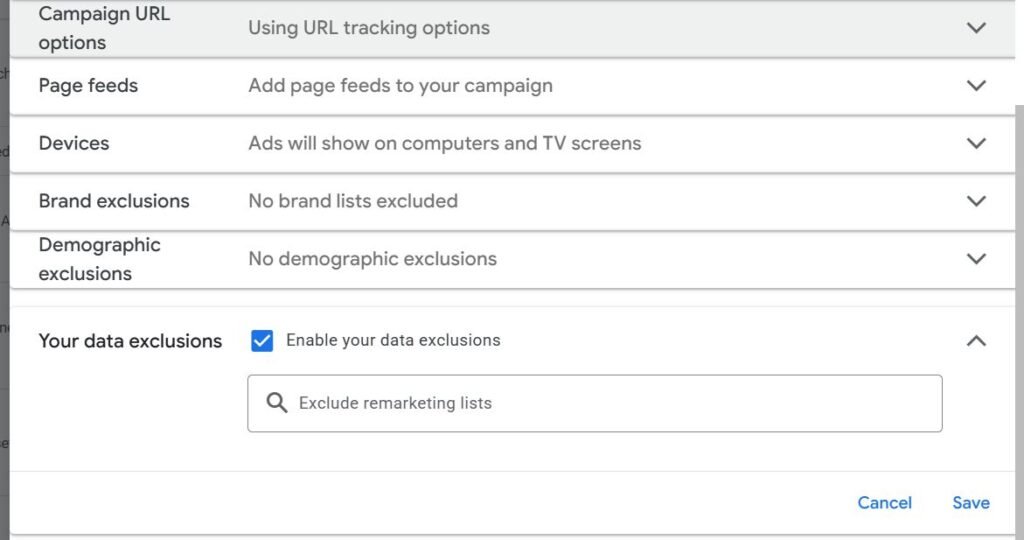
If the feature is available in your account, you can enable it by following these steps:
- Go to Campaign Settings
- Navigate to Your Data Exclusions
- This section is typically located under Demographic Exclusions
- Enable data exclusions
- Select the Website Visitor List or Customer Match List you want to exclude
- Save your changes
Once applied, Google Ads will stop using the selected data for campaign optimization during the exclusion period.
Is This Feature Available to Everyone?
The rollout is gradual, so not all advertisers may see this option immediately. It’s recommended to regularly check your Google Ads account settings to see if Data Exclusions for Performance Max campaigns have been enabled for you.
Performance Max has already transformed how advertisers manage multi-channel campaigns, and this update adds a much-needed layer of control.
Need Help Managing Performance Max Campaigns?
Setting up Performance Max correctly and using advanced features like data exclusions requires experience and ongoing monitoring.
For expert setup, optimization, and performance tracking, consider our Google Ads Management Service. We help businesses drive qualified traffic, improve ROI, and scale campaigns with precision.
Talk to a Google Ads Expert now: +91 8010 577 577
Email: info@digitaladvertisementagency.com
More information: www.digitaladvertisementagency.com