

Google Adds Official Help Page for Review Requests via Link or QR Code
Google has introduced a new option that allows businesses to request customer reviews by sharing a direct link or a QR code. To support this feature, Google has now published an official help page explaining how businesses can use it effectively.
According to the help documentation, businesses can make it easier for customers to leave reviews on their Google Business Profile by creating and sharing a review link or QR code. Google recommends placing this link or QR code in common customer touchpoints, such as:
- On printed or digital receipts
- In thank-you or follow-up emails
- At the end of customer chat conversations
- Displayed as a QR code within physical store locations
Google also highlights the importance of authenticity when collecting reviews. All reviews must reflect genuine customer experiences. The company clearly states that offering incentives; such as free products, discounts, or services – in exchange for reviews is not allowed. Any form of fake engagement, including posting, modifying, or removing reviews, violates Google Business Profile policies and may lead to restrictions.
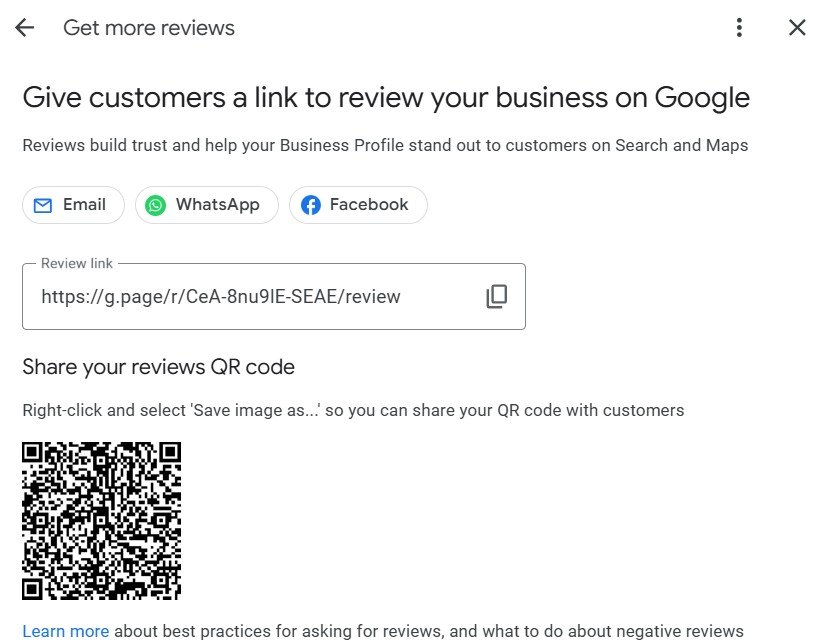
For businesses looking to access or share the review link or QR code, Google outlines a simple process:
- Open your Google Business Profile
- Navigate to Read Reviews and select Get more reviews
- Share the review link or QR code using the available options
- To copy the link, select Copy
- To download the QR code, right-click on it and choose Save image as
This update makes it easier for businesses to encourage honest customer feedback while staying aligned with Google’s review policies.
Contact Us Today:
If you have questions about the latest Google Business Profile Optimization or are facing challenges, our SEO experts are here to help you resolve them.
Speak with a Specialist: +91 8010 577 577
Email: info@digitaladvertisementagency.com
More information: www.digitaladvertisementagency.com